GIF compressor · choose a preset
GIF Compressor Settings Explained: Dimensions, Colors, and Frames
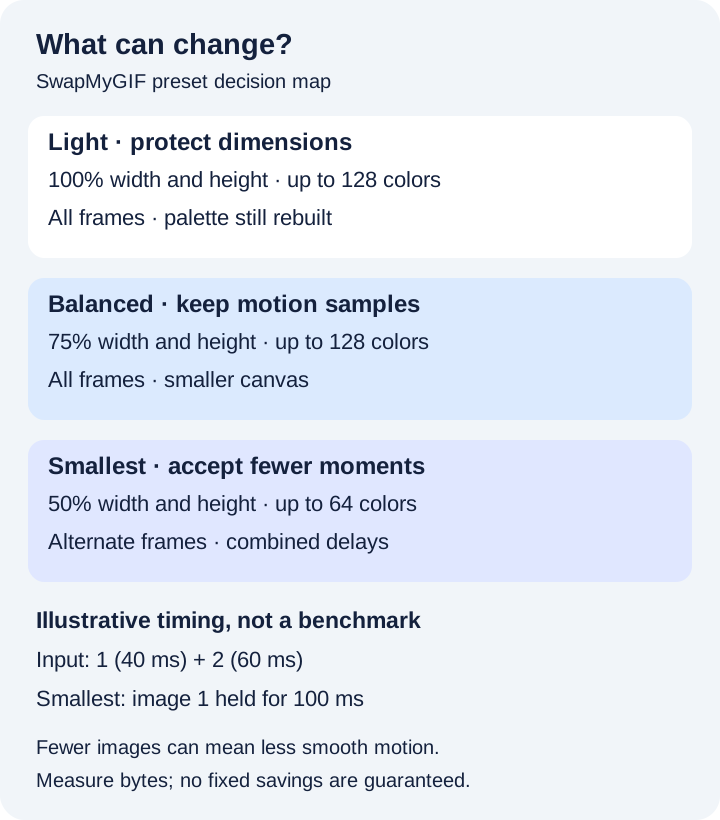
Direct answer: choose Light to keep the original dimensions and every frame; choose Balanced when a smaller display size is acceptable but all motion samples matter; choose Smallest only when you can accept half-size dimensions, fewer colors, and fewer motion samples. Compare the actual bytes and replay the result: no preset guarantees a smaller file.
First-party preset reference
What each setting changes in this tool
| Preset | Width and height | Palette limit per frame | Frames written |
|---|---|---|---|
| Light | Original dimensions | 128 colors | Every decoded frame |
| Balanced | 75% of each dimension | 128 colors | Every decoded frame |
| Smallest | 50% of each dimension | 64 colors | Frames 1, 3, 5…; skipped delays accumulated |
Source: a November 2 code audit of SwapMyGIF's current compressor implementation, specifically its preset definitions, output-size calculation, frame loop, and delay function. These are configured limits and deterministic rules, not measured compression results. The presets bundle settings; the tool has no separate color or frame sliders.
Decision 1 · readable detail
Reduce dimensions when the GIF will display smaller
Start with the space where the GIF will be viewed. Small caption text, thin outlines, and tiny faces can become hard to read after scaling. Light keeps the canvas size, so it is the first preset to compare when those details matter. Balanced keeps every frame while reducing width and height; use it when the final display can be smaller.
For an illustrative 640 × 360 input, the code calculates 480 × 270 with Balanced and 320 × 180 with Smallest. It rounds each scaled dimension to the nearest whole pixel, with a minimum of one pixel. At these exact dimensions, Balanced retains 56.25% of the pixel positions per frame; Smallest retains 25%. Those are pixel-area ratios, not predicted file-size savings. Palette selection and the source encoding also affect the bytes.
Need an exact output width or height instead of a bundled preset? Use the GIF resizer.
Decision 2 · gradients and edges
A color limit is not a quality percentage
Light and Balanced both request up to 128 palette colors per output frame. Smallest requests up to 64. A frame with fewer distinct colors may use fewer entries; “128 colors” does not mean 128% quality or a promised byte count.
The compressor builds a palette separately for each retained frame using RGBA4444 quantization and maps the rendered pixels to that palette. Smooth skies, skin gradients, and transparent edges deserve a close look. Light still rebuilds the palette even though it preserves dimensions and frame count, so it is not a lossless or byte-preserving mode. There is no dither switch or global-palette selector in this interface. The controlled color audit isolates that palette step with a 256-color fixture; for binary alpha and disposal behavior, use the transparency audit.
The GIF89a specification defines indexed color tables and frame delays. For a separate explanation of palette symptoms in the face-swap encoder, see the GIF dithering guide; that encoder's settings differ from this compressor's.
Decision 3 · motion samples
Smallest skips images while carrying their time forward
Smallest composites every decoded source frame in order, including skipped frames, so their disposal and drawing effects can contribute to later retained images. It writes only frames at zero-based indexes 0, 2, 4, and so on. A source with five frames therefore writes three, rather than an exact half.
For each retained image, the delay function adds its own delay and the following skipped frame's delay when one exists. In an illustrative sequence with delays of 40, 60, 80, 100, and 120 milliseconds, Smallest writes images 1, 3, and 5 with delays of 100, 180, and 120 milliseconds. Both sums are 400 milliseconds, but the output shows fewer distinct moments. A quick gesture that occurs only in image 2 can disappear even though its time is retained.
Timing boundary: the code uses a 100 ms fallback for a missing or zero decoded delay and clamps each contributing delay to at least 20 ms before adding it. Very short source delays can therefore change the total duration. Preserving the sum of normalized delays does not guarantee identical playback in every viewer. The five-frame timing audit records the decoded source and all three production outputs. For motion that must remain fully sampled, compare Light or Balanced first.
A repeatable choice
Compare presets from the same original
- Keep the original file. Use it as the input for each preset so earlier scaling and palette loss do not accumulate.
- Try Light when dimensions matter. Inspect small text and gradients and read the size-change warning.
- Try Balanced when smaller dimensions fit. Compare detail at the actual intended display size, then replay one full loop.
- Try Smallest only if needed. Check fast motion and the loop boundary as well as color and readability.
- Keep the acceptable result. If the output is larger or loses essential detail, retain the original. There is no automatic target-byte control.
The current compressor accepts one GIF up to 30 MB and rejects a source canvas whose pixel area exceeds 1920 × 1080. Work runs locally in the tab, but a file inside those limits can still demand substantial device memory. The decoded-size audit measures exact RGBA patch bytes for one controlled 512 × 512 fixture. This guide reports an implementation audit and arithmetic examples; it does not claim measured savings or device performance.
Direct answers
Preset questions
Which preset keeps every frame?
Light and Balanced write every decoded frame. Smallest writes alternate frames and accumulates their normalized delays.
Does 50% size mean a file that is 50% smaller?
No. Smallest scales both width and height to 50%, subject to rounding, and also changes colors and frame sampling. The actual byte difference is known only after encoding.
Why can a compressed GIF be larger?
This tool rebuilds frames and palettes. An already efficiently encoded source can be smaller than the rebuilt result. Read the reproducible larger-output diagnosis, then keep the original when the pass does not help.
Choose what you can afford to change.
Protect readable detail first, then compare dimensions, color, and motion in the actual result.
Compare the presets