GIF dithering · palette diagnosis
GIF Dithering: Why Face Swap Colors Look Grainy
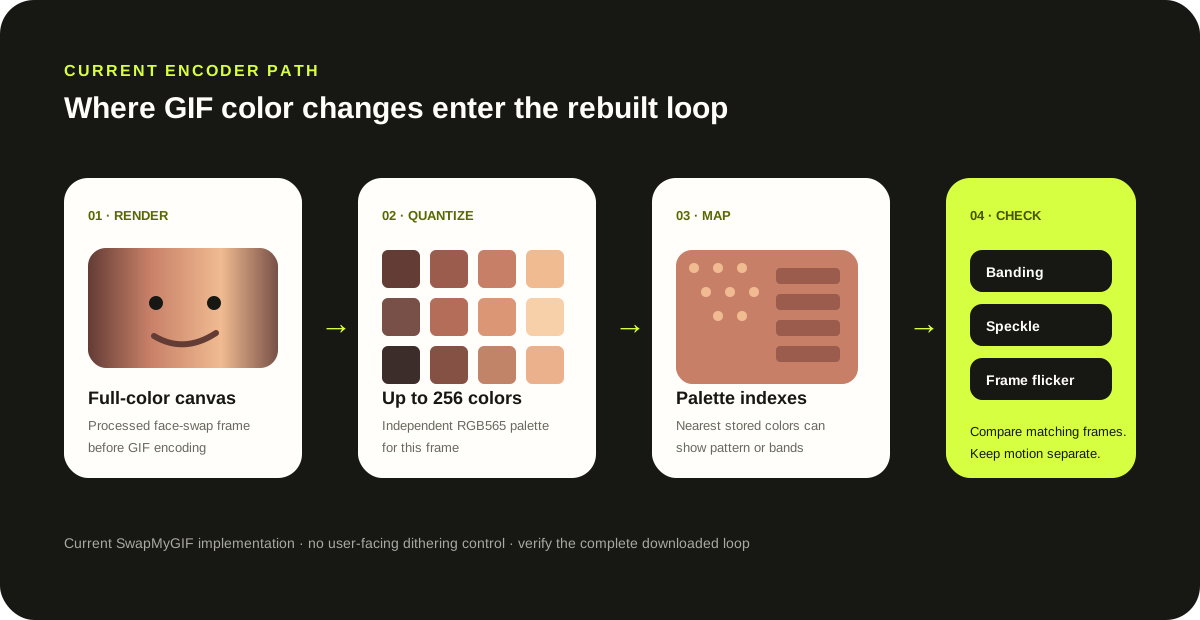
Direct answer: GIF dithering is a pattern of neighboring palette colors used to suggest colors the file cannot store directly. After a face swap, grain, bands or color flicker can appear when full-color rebuilt frames are reduced to GIF palettes. SwapMyGIF currently creates a separate palette of up to 256 RGB565 colors for each frame and maps pixels to that palette; it does not expose a dithering control.
First-party code audit
What this encoder actually does
- Palette scope
- Per frame
- Maximum colors
- 256
- Quantizer format
- RGB565
- Dither switch
- None
Verified against the current SwapMyGIF browser encoder on October 2, 2026. The code calls quantize(..., 256, { format: 'rgb565' }), maps the frame with applyPalette, and writes that indexed frame. This describes the current implementation, not every GIF encoder.
Name the symptom first
Dithering, banding and flicker are not the same failure
| What you see | Likely layer | Useful next check |
|---|---|---|
| Fine dots or a grain-like pattern in a smooth cheek | Palette colors are alternating spatially to approximate an unavailable color. | Compare the source and output at the same frame; look for a repeating texture rather than a misplaced face. |
| Flat stripes across a skin or sky gradient | Banding: too few stored colors cover the gradient. | Try a source with flatter lighting or less gradient detail around the target. |
| A region changes color between adjacent frames | Per-frame palettes may choose different representatives, although motion or blending can also contribute. | Step through neighboring output frames and see whether placement stays stable while only color changes. |
| The face jumps, disappears or changes size | Detection or frame tracking, not GIF dithering. | Use the motion and timing checklist and inspect the whole loop. |
| A hard oval or halo surrounds the face | Blend boundary or source mismatch, not a palette pattern by itself. | Choose a portrait with closer lighting and angle before blaming the encoder. |
Reproducible inspection
Separate palette evidence from face-placement evidence
- Freeze one matching frame. Compare the source GIF and rebuilt output at the same moment. Do not diagnose color from two different poses.
- Inspect a smooth area. Cheeks, foreheads and soft backgrounds reveal bands or patterned color changes more clearly than hair or text.
- Advance one frame. If the face stays aligned but its color pattern changes, the palette is a stronger suspect. If position changes, tracking is involved too.
- Change one input condition. Try a shorter crop or a source with flatter lighting. Repeating the same two files does not change their gradients or motion.
- Keep the conclusion narrow. A palette limit can explain a visible color artifact; it does not prove that quantization caused every quality problem in the result.
Measured limitation
Our recorded fixture did not isolate palette loss as the main defect
In the September 26 quality run, the shared test GIF was 512 × 512, four frames and 670 ms. The rebuilt SwapMyGIF file kept those values and measured 269,521 bytes. The dominant visible issues were the photographic blend and frame-to-frame placement; the report lists independent per-frame palette variation only as a possible secondary limitation. That is why this page offers a diagnosis method rather than claiming that dithering caused that result.
First-party record: measured browser workflow. The test supports the dimensions, frame count, duration and output size above; it does not measure a dithering score.
Format boundary
GIF stores palette indexes, not unrestricted full color
MDN documents GIF as an 8-bit indexed-color format whose color tables can contain up to 256 entries, and notes that dithering can simulate colors outside that palette. The GIF89a specification defines the color-table and pixel-index structure. Those format facts explain why a full-color canvas frame must be reduced before it can become a GIF frame.
Direct answers
GIF dithering questions
Does SwapMyGIF add dithering?
The current encoder quantizes each rebuilt frame to an indexed palette and maps pixels to their nearest palette colors. It does not expose a dithering algorithm or user-controlled dither setting, so the safest description is palette quantization, not a claim that a specific dither is applied.
Can I turn dithering off?
No. There is no dither toggle in the current interface. You can instead choose source material with flatter gradients and inspect the complete output loop before downloading.
Why can colors flicker even when the face stays in place?
SwapMyGIF builds a palette independently for each frame. Adjacent frames can therefore map similar full-color pixels to different palette colors. Motion, blending and source lighting can also change color, so compare neighboring frames before assigning a cause.
Will a larger file remove palette artifacts?
Not by itself. File size and palette selection are related to encoding but are not interchangeable quality controls. This tool does not provide palette-size or dither settings.
Use the symptom