GIF compressor · decoded-size audit
Why Can a Small GIF Need More Memory to Compress?
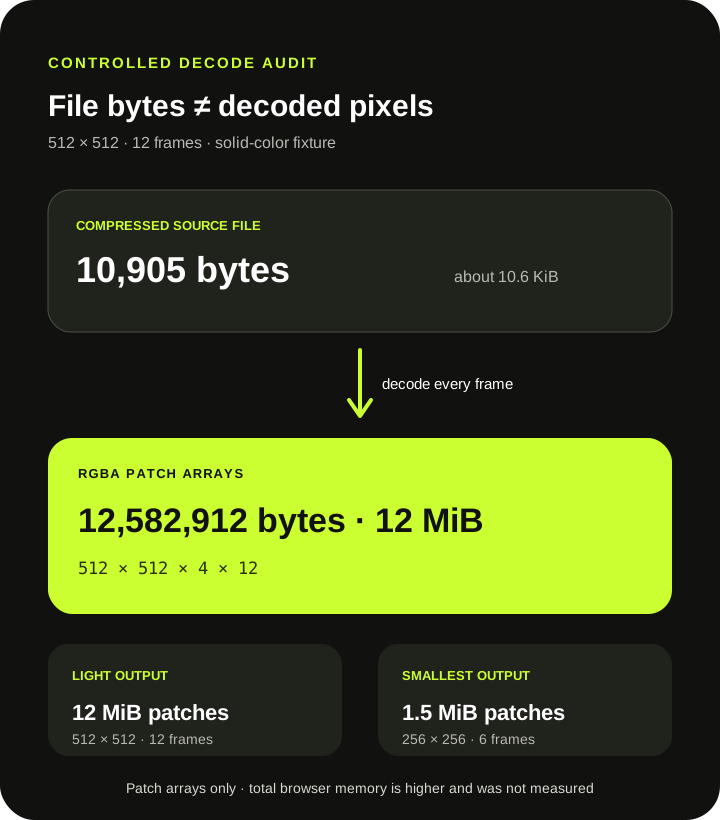
Direct answer: a GIF's file size measures compressed storage, not the pixel buffers needed after decoding. In a controlled production test, a 10,905-byte GIF expanded into 12,582,912 bytes—12 MiB—of RGBA frame patches before the preset was applied. That measured patch payload is 1,153.9 times the source file size and still excludes canvases, palettes, encoder data, and browser overhead.
Measured production path
A 10.6 KiB source produced 12 MiB of decoded patch pixels
| File | Dimensions · frames | File bytes | Decoded RGBA patches |
|---|---|---|---|
| Source | 512 × 512 · 12 | 10,905 | 12,582,912 bytes · 12 MiB |
| Light output | 512 × 512 · 12 | 10,905 | 12,582,912 bytes · 12 MiB |
| Smallest output | 256 × 256 · 6 | 2,739 | 1,572,864 bytes · 1.5 MiB |
Method: scripts/verify-gif-compressor-decoded-size.mjs generated a 512 × 512, 12-frame solid-color fixture, processed it through the production Light and Smallest presets in headless Chrome, decoded the source and outputs, and summed every returned RGBA patch's exact byteLength. The figures describe patch arrays only, not total JavaScript or browser memory.
Pixel arithmetic
Width × height × four channels × frames explains the patch total
The fixture has 512 × 512 pixels in each of 12 full-frame patches. Each decoded patch stores red, green, blue, and alpha values. The measured total is therefore 512 × 512 × 4 × 12 = 12,582,912 bytes.
MDN documents ImageData pixel storage as RGBA values in a typed array, with four values per pixel for the usual 8-bit format. SwapMyGIF's bundled decoder returns the same four-channel patch shape used by the compressor's canvas workflow.
Preset order
Smallest reduces the output after the full source has been decoded
The current compressor calls its decoder for every source frame before calculating the output dimensions and entering the preset write loop. The controlled source therefore produced the same 12 MiB of decoded patch payload before either Light or Smallest began rebuilding frames.
Smallest then wrote six 256 × 256 frames. Decoding that output produced 1.5 MiB of patch pixels, one eighth of the source payload: half the width, half the height, and half the frames. That smaller output does not retroactively lower the source decoding work required for the current run.
What this test does not measure
Patch bytes are a reproducible slice, not a heap estimate
The 12 MiB figure is the sum of decoded frame-patch arrays. It does not include the source ArrayBuffer, parsed GIF structures, compositing canvas, output canvas, temporary ImageData, palettes, indexed frames, encoder buffers, object overhead, or the rest of the page. It must not be presented as total browser memory.
It also does not predict failure on a particular phone or computer. Available memory, browser behavior, other tabs, patch dimensions, frame count, and image content can all differ. The reliable conclusion is narrower: a small compressed file can decode into far more pixel data than its file size suggests.
A practical retry order
Reduce source dimensions or frames before reopening the compressor
- Check dimensions and frame count, not only file megabytes. Pixel workload grows with both.
- Close unnecessary tabs and keep the compressor tab active. Browser-local processing shares device resources with other pages.
- Prepare a smaller source before retrying. Use the GIF resizer when exact smaller dimensions are acceptable.
- Shorten elsewhere when fewer moments are acceptable. This compressor has no trim control; Smallest drops alternate output frames only after source decoding.
- Keep the original. A successful run can still produce a larger or visibly worse file; compare the measured result.
The compressor accepts a file up to 30 MB and rejects a logical canvas above 1920 × 1080 pixels. Those input gates do not promise that every accepted combination of dimensions and frames will fit every device's available memory.
Direct answers
GIF compressor memory questions
Why can a tiny GIF file still be expensive to decode?
GIF compression can represent repeated or simple pixels compactly on disk. The compressor still needs decoded RGBA pixels for each returned frame patch.
Does Smallest avoid decoding the full source?
No. The current tool decodes all source frames before Smallest scales dimensions and writes alternate output frames.
Is 12 MiB the test's total browser memory?
No. It is only the exact sum of decoded RGBA patch arrays. Canvas, encoder, parsed-data, object, and browser overhead are excluded.
Will a 30 MB GIF always compress successfully?
No. Thirty megabytes is a file-size acceptance limit, not a memory guarantee. Dimensions, patch sizes, frame count, and the current device still matter.
Count decoded pixels, not only download bytes.
A compact file can still open into many full-color frame buffers before compression begins.
Compress and measure