GIF compressor · timing audit
Does Compressing a GIF Change Its Speed?
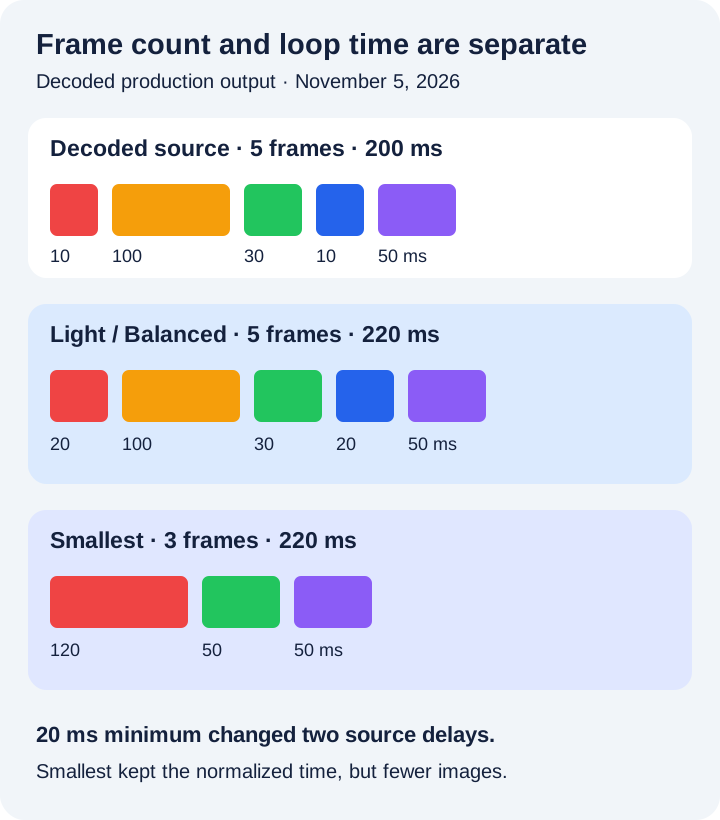
Direct answer: it can. SwapMyGIF writes every contributing delay as at least 20 ms and uses a 100 ms fallback when the decoded delay is missing or zero. Light and Balanced keep every decoded frame, while Smallest keeps alternate images and combines their normalized delays. In a controlled five-frame test, all three outputs recorded 220 ms instead of the decoded source's 200 ms.
Measured production output
Five source frames became five, five, or three output frames
| File | Dimensions | Decoded delays | Frames · total |
|---|---|---|---|
| Source | 16 × 16 | 10 · 100 · 30 · 10 · 50 ms | 5 · 200 ms |
| Light | 16 × 16 | 20 · 100 · 30 · 20 · 50 ms | 5 · 220 ms |
| Balanced | 12 × 12 | 20 · 100 · 30 · 20 · 50 ms | 5 · 220 ms |
| Smallest | 8 × 8 | 120 · 50 · 50 ms | 3 · 220 ms |
Method: scripts/verify-gif-compressor-timing.mjs generated a five-frame solid-color fixture, processed it through all three production presets in headless Chrome, decoded each output, and summed its recorded delays. The source was 313 bytes; Light was 313, Balanced 278, and Smallest 159. These results belong to this fixture and do not predict another GIF's bytes or playback.
Decode boundary
A zero delay did not remain zero in the decoded source
The fixture requested frame delays of 10, 0, 30, 10, and 50 ms. Its encoded zero-delay frame was reported as 100 ms by the site's bundled decoder, so the compressor received 10, 100, 30, 10, and 50 ms: a decoded total of 200 ms.
That distinction matters. This page compares the compressor's decoded input with its decoded output; it does not claim that a zero-delay source frame has one universal playback duration. GIF stores delays in hundredths of a second, and viewers may apply their own scheduling behavior to very short values. The GIF89a specification defines the delay field but does not promise identical wall-clock playback in every viewer.
Light and Balanced
Keeping every frame does not mean keeping every delay value
Before encoding, SwapMyGIF's delay function takes each contributing decoded delay and applies a 20 ms minimum. In the controlled source, the first and fourth frames were 10 ms each. Both became 20 ms, increasing the recorded total from 200 to 220 ms. The 100, 30, and 50 ms values did not change.
Light kept 16 × 16 dimensions and five frames. Balanced scaled the canvas to 12 × 12 and also kept five frames. Their recorded delay sequences were identical. The timing change came from normalization, not scaling or palette size.
Smallest
Dropped images kept their normalized time in this test
Smallest retained zero-based frames 0, 2, and 4. It grouped the first retained frame with the following skipped frame, producing 20 + 100 = 120 ms. The next group produced 30 + 20 = 50 ms. The odd final frame remained 50 ms. The three output delays therefore totaled the same normalized 220 ms as Light and Balanced.
Equal recorded duration does not mean equal motion. Smallest showed three distinct images instead of five. A gesture or expression visible only in a skipped image can disappear while its time is carried into the preceding retained image. For motion that must remain fully sampled, compare Light or Balanced first. The preset reference documents the exact dimension, palette, and frame rules.
A repeatable timing check
How to review speed after compression
- Start each test from the original. Recompressing an output can normalize delays again and accumulate visual losses.
- Use Light as the timing baseline. It keeps dimensions and every decoded frame, making delay normalization easier to isolate.
- Replay more than one loop. Inspect quick gestures, pauses, and the transition from the last frame back to the first.
- Compare motion samples as well as total time. Smallest can keep the normalized total while removing distinct images.
- Test the destination viewer. Browser tabs, chat apps, editors, and operating systems may schedule very short delays differently.
The result panel reports dimensions, written-frame count, and bytes, but it does not display total delay. If timing is critical, use a frame inspector or keep the original when the loop feels different.
Frame delay is separate from repeat metadata. If the animation must stop after a finite number of cycles, read the controlled loop-count audit.
Direct answers
GIF compressor speed questions
Will Light preserve animation speed exactly?
Not for every source. Light keeps every decoded frame, but this compressor writes each contributing delay as at least 20 ms and uses a 100 ms fallback for a missing or zero decoded delay.
Does Smallest make the GIF play twice as fast?
No fixed ratio applies. Smallest keeps alternate images and adds each skipped frame's normalized delay to the preceding retained image. The recorded total can stay the same while motion becomes less detailed.
Why can two viewers play the same GIF differently?
GIF delay metadata is only part of playback. A viewer can clamp or schedule very short frames differently, so compare the loop in the destination viewer.
Can the compressor set a target duration or frame rate?
No. The current interface has three fixed presets and no duration, speed, or frames-per-second control.
Count time and motion as separate results.
A similar total duration can still contain fewer visible moments. Replay the full loop in the viewer that matters.
Compress and compare