GIF compressor · larger output diagnosis
Why Can a GIF Compressor Make a File Larger?
Direct answer: compression is a new encoding pass, not a promise. If the source is already compact, the rebuilt GIF's loop control, frame control, palettes, and image data can cost more bytes than the tool removes. Compare the exact output with the original and keep the original whenever the pass is larger or looks worse.
Two reproducible outcomes
The same compressor can shrink one source and grow another
| Source and preset | Input | Output | Measured change |
|---|---|---|---|
| 1 × 1, one frame · Light | 34 bytes | 64 bytes | 88.2% larger |
| 512 × 512, four frames · Light | 255,554 bytes | 203,494 bytes | 20.4% smaller |
| Same four-frame source · Balanced | 255,554 bytes | 115,740 bytes | 54.7% smaller |
| Same four-frame source · Smallest | 255,554 bytes | 22,683 bytes | 91.1% smaller |
Method: headless Chrome loaded the production compressor, selected a local fixture, ran each preset, fetched the generated Blob, and counted its bytes. The four-frame source is docs/quality-report/swapmygif-before.gif. The 34-byte boundary fixture is the complete GIF89a byte sequence recorded in the test script. These results describe two files, not expected savings for another GIF.
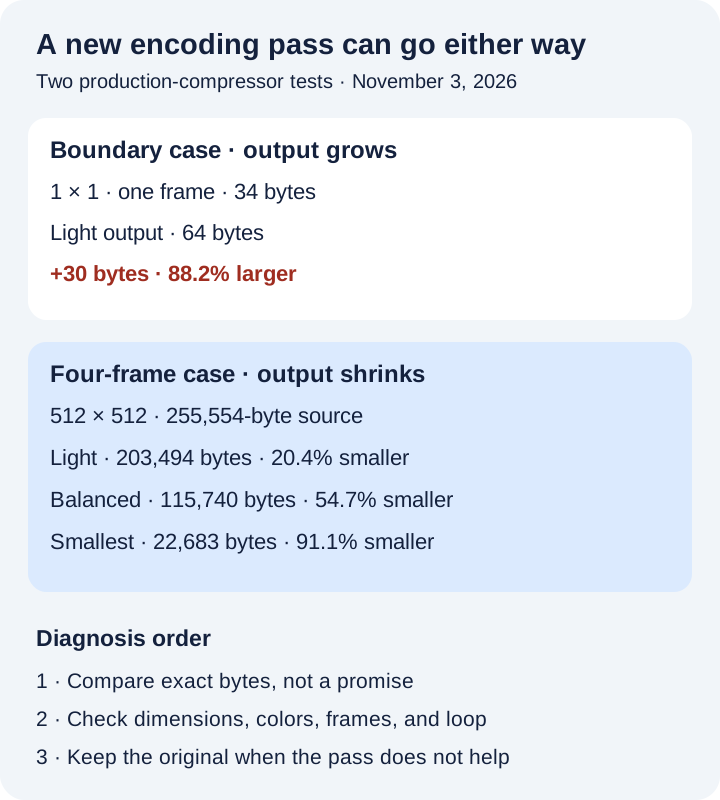
Byte audit · larger case
A tiny source can have nowhere useful to shrink
The 34-byte test file contains one 1 × 1 image. Its source stream has a GIF89a header, logical screen and color table, one image block, and a trailer. It does not contain a loop application extension or a Graphic Control Extension.
The 64-byte output retains the 1 × 1 dimensions and one written frame. Its byte stream includes a NETSCAPE2.0 loop application extension and a Graphic Control Extension before the rebuilt image. The encoder also writes a new image-data stream. Those structures are valid, but their cost is larger than the entire compact source's remaining opportunity for reduction.
The result panel rounded both files to “1 KB” because its compact display never shows less than 1 KB. The percentage was still calculated from the exact Blob sizes: 34 and 64 bytes. For unusually small files, inspect the downloaded file's exact byte count rather than relying on rounded labels alone.
Implementation boundary
Rebuilding rendered frames can discard earlier optimization
SwapMyGIF decodes the source, composites each frame onto a full source-sized canvas, redraws the selected output size, quantizes a palette, and writes a new GIF frame. That makes the result predictable for this tool's presets, but it does not preserve the source encoder's exact block layout, sub-rectangle choices, palette sharing, or compressed image stream.
A source may already store only the changing rectangle or use an efficient palette and LZW stream. Rebuilding full rendered frames can replace those choices with a different tradeoff. The GIF89a specification defines image descriptors, color tables, control extensions, and compressed image data; it does not require two encoders to produce the same byte count for the same visible pixels.
This tool's Light preset keeps dimensions and every decoded frame, but it still rebuilds palettes and image data. Balanced additionally scales both dimensions to 75%. Smallest scales to 50%, limits the palette further, and writes alternate frames. See the exact preset and delay reference before changing motion.
A repeatable diagnosis
What to do when the output is larger
- Keep the original. Do not overwrite the only copy before comparing the complete result.
- Read the exact direction. The result explicitly says “smaller” or “larger.” Rounded KB labels can hide a tiny byte difference.
- Check what the preset changed. Light still re-encodes; Balanced changes dimensions; Smallest changes dimensions, colors, and frame sampling.
- Replay the whole loop. A smaller byte count is not useful if text, gradients, transparency, fast motion, or the loop boundary no longer works for the intended use.
- Stop when the pass does not help. There is no target-byte mode and no guarantee that a more aggressive pass will preserve the details you need.
Do not repeatedly compress the previous output while searching for a smaller file. Start each comparison from the original so dimension, palette, and frame losses do not accumulate.
Direct answers
Larger-output questions
Does a larger result mean the compressor is broken?
No. It means this encoding pass produced more bytes for that source. The tool warns about the result so you can keep the original.
Why did Light make a new file at all?
Light preserves dimensions and frame count, but it still composites frames, builds new per-frame palettes, and writes new image and control blocks. It is not a lossless container optimizer.
Will Smallest always fix a larger output?
No. It changes more information and often has more opportunity to reduce bytes, but no preset guarantees a smaller result. Measure the file and review its visible quality and motion.
Can this compressor hit an exact upload limit?
No. The current tool has three fixed presets and reports the result after encoding. It does not search for a requested target byte count.
Keep the smaller acceptable version, not just the newest one.
Measure exact bytes, replay the loop, and retain the original whenever the rebuilt file is larger or loses essential detail.
Run a measured comparison