Free workflow · measured result
GIF Face Swap Online Free
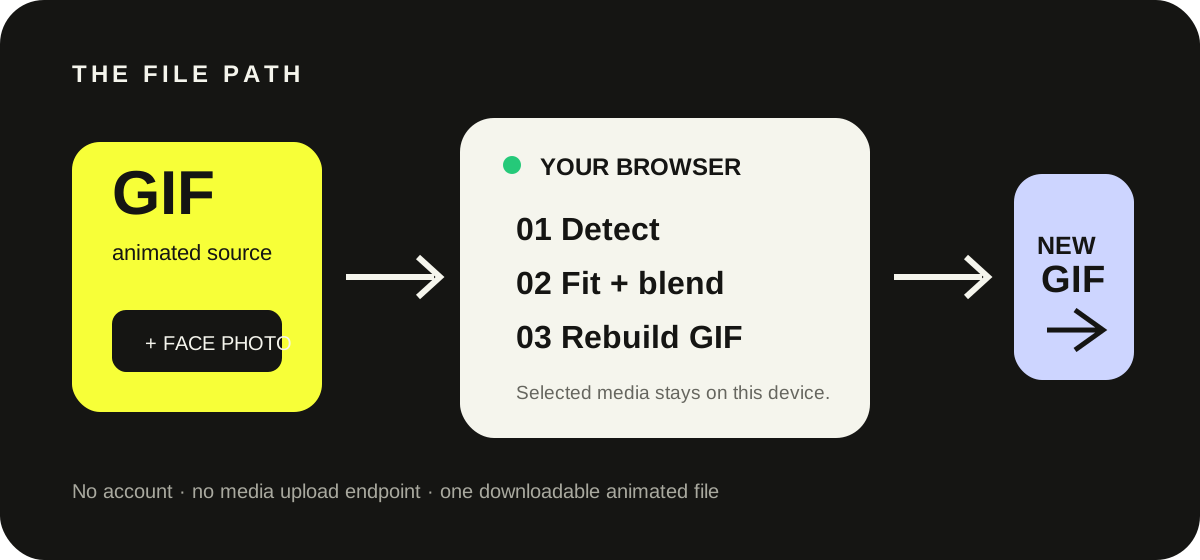
Direct answer: upload one GIF and one JPG, PNG or WEBP face photo, run the swap inside your browser, and download the rebuilt GIF. SwapMyGIF does not require an account or send the selected media to a processing API.
Reproducible evidence
What our browser test actually produced
We ran the published tool with a real animated GIF and a real face photo on September 24, 2026. The same pair completed on a desktop viewport and at 480 px wide.
- Canvas
- 337 × 193 px
- Animation
- 27 frames
- Duration
- 2.7 seconds
- Download
- 926 KB GIF
Source: measured in our own browser acceptance test; these values describe that test file, not a guaranteed result for every GIF.
Define “free” before uploading
What the workflow includes
No account gate
Open the tool and select both files without creating a profile, entering a card or starting a trial.
Local media processing
The page loads code and face models, but the selected GIF and face photo stay in the browser instead of going to a face-processing endpoint.
A real GIF download
The output keeps its animation and downloads as one GIF file rather than a video preview or a set of still images.
Exact workflow
From two files to one animated result
- Choose the GIF. Prefer a clip where the target face is visible, reasonably large and not covered by text or hands.
- Choose the face photo. A front-facing, well-lit photo gives the detector more stable landmarks.
- Run the swap. Keep the tab open while the browser decodes, detects, blends and re-encodes the frames.
- Read the output report. Check the dimensions, frame count, duration and file size shown next to the preview.
- Download and replay. Open the saved GIF once to confirm the loop and timing survived re-encoding.
Diagnose the symptom
Fix the source before repeating the same swap
| What you see | Likely source condition | Best next test |
|---|---|---|
| No face detected | The face is tiny, hidden or turned too far away. | Try a GIF with a larger visible face and a straight, unobstructed photo. |
| Face jumps between frames | The target changes angle quickly or leaves the frame. | Use a shorter section with steadier head movement. |
| Colors look flatter | GIF encoding is restricted to a 256-color palette. | Start with a source that has fewer gradients and less fine texture. |
| Output is unexpectedly large | The canvas or frame count is high. | Trim or resize the source GIF before running the swap again. |
| Edges look harsh | Lighting, angle or scale differs sharply between the two faces. | Choose a face photo closer to the target pose and lighting. |
Know the network boundary
Local processing does not mean an offline page
The page needs network access to load its HTML, scripts, face-model files and Cloudflare delivery telemetry. The difference is where your selected media goes: the GIF and photo are read by browser code and are not posted to a remote face-processing API. Closing or refreshing the tab clears the in-page selection and result.
Quick answers
Free GIF face swap questions
Will the output still animate?
Yes. The tool rebuilds the processed frames as a downloadable animated GIF and preserves the timing reported in the result panel.
Does it work on a phone?
The interface is responsive and our 480 px browser test completed with the same test files and output measurements as the desktop test. Very large GIFs can still be demanding on a low-memory phone.
Why is the result not photo-perfect?
A GIF has limited color depth, while fast pose changes, small faces and occlusion reduce the information available in individual frames. A clear source pair matters more than repeatedly processing a weak pair.
Ready to test your files?