GIF compressor · browser compatibility
Which Browsers Work With This GIF Compressor?
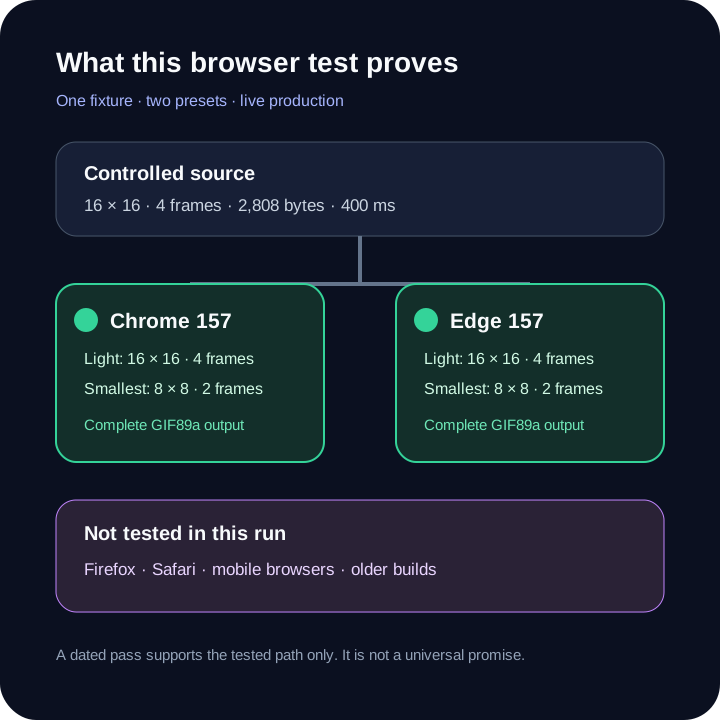
Direct answer: the live compressor completed the same controlled Light and Smallest runs in installed Chrome 157 and Edge 157 on Windows 11. Both browsers returned complete GIF89a files with the expected dimensions and frame counts. Firefox and Safari were not tested in this run, so this page does not label them compatible or incompatible.
Tested matrix
Two installed browsers, two presets, one fixture
| Browser | Light result | Smallest result | Status |
|---|---|---|---|
| Google Chrome 157 · Windows 11 | 16 × 16 · 4 frames · 2,808 bytes | 8 × 8 · 2 frames · 609 bytes | Tested successfully |
| Microsoft Edge 157 · Windows 11 | 16 × 16 · 4 frames · 2,808 bytes | 8 × 8 · 2 frames · 609 bytes | Tested successfully |
| Mozilla Firefox | Not tested | Not tested | No result claimed |
| Apple Safari | Not tested | Not tested | No result claimed |
Method: scripts/verify-gif-compressor-browsers.mjs generated a 2,808-byte, 16 × 16, four-frame GIF, selected it in the live compressor through each installed browser, ran Light and Smallest, fetched each result Blob, and asserted its visible dimensions, frame count, GIF89a header, and final 0x3B trailer. The test covers these browser builds, this operating system, this fixture, and this date only; it is not a universal promise.
What the page actually needs
Compatibility is a chain, not a browser-name badge
The tool must read the selected file, decode GIF frames in JavaScript, draw complete frames into a two-dimensional canvas, create indexed palettes, encode a new GIF, expose the result through a Blob URL, and let the browser download it. A browser can load the page yet still fail later because the file is too large, has no readable frames, or expands beyond the compressor's canvas-area gate.
That is why the matrix records an end-to-end run instead of checking only whether the page opened. It verifies file selection, script execution, canvas work, local encoding, result preview, and output bytes for the controlled fixture.
How to read the result
Same output bytes are useful evidence, not universal equivalence
Chrome and Edge produced identical bytes for both tested presets. Light retained 16 × 16 dimensions and all four frames. Smallest produced 8 × 8 dimensions and two retained frames, matching the current 50% scale and alternate-frame preset. Every result began with GIF89a and ended with the required trailer byte.
The fixture is intentionally small and deterministic. It does not measure maximum usable file size, memory pressure, rendering speed, mobile behavior, extension interference, private-browsing restrictions, or a different browser engine. Installed patch versions were Chrome 157.0.8103.40 and Edge 157.0.4341.46; the automated browser identities reported major version 157.
Your own compatibility check
Use one small copy before processing an important GIF
- Update the browser. Retest after a browser or operating-system update instead of relying on this dated matrix.
- Choose a small known-good GIF. A malformed source tests the file, not the browser.
- Run Light first. Confirm that a preview and download appear without an error.
- Replay the complete output. Inspect dimensions, frames, colors, transparency, timing, and loop behavior.
- Keep the original. The compressor writes a new file and never updates the source in place.
If the page loads but the run stops, match its exact message in the compressor error guide. If a face-swap workflow fails instead, use the separate face-swap browser-readiness guide; it tests a different tool and dependency chain.
Direct answers
GIF compressor browser questions
Does the GIF compressor work in Chrome?
Chrome 157 on Windows 11 completed the controlled Light and Smallest production runs. That result does not guarantee every Chrome version, device, extension set, or GIF.
Does it work in Microsoft Edge?
Edge 157 on Windows 11 completed the same two runs and produced the same output bytes as the tested Chrome build.
Does it work in Firefox or Safari?
This run did not test Firefox or Safari. They are marked not tested rather than guessed compatible or incompatible.
Why can the page open but compression still fail?
Loading the interface is only the first step. The selected file must also pass the type, byte-size, readable-frame, and canvas-area gates before local encoding can finish.
Run a small known-good GIF first.
The result panel is a better compatibility check than a browser-name assumption.
Test this browser