Up to 80 characters
The tool centers and wraps the caption into as many as three lines. Short text remains easier to read on small GIFs.
Every frame · local processing
Ready in your browser
Direct answer: choose a GIF, type your caption, set its position and colors, then rebuild and download the animation. The browser draws the text into every frame; your file is not uploaded to SwapMyGIF.
The tool centers and wraps the caption into as many as three lines. Short text remains easier to read on small GIFs.
Choose one fixed position. The caption stays there on every frame; it does not follow a moving subject or use a timeline.
Choose separate text and outline colors. A contrasting outline helps the same caption survive changing frame backgrounds.
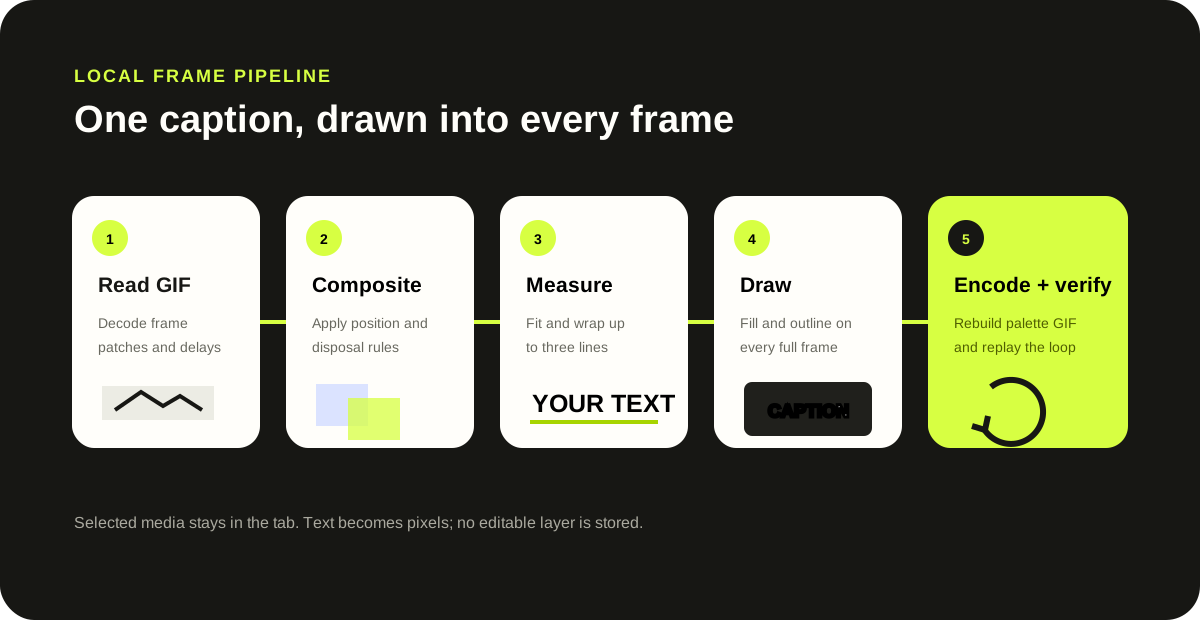
The caption becomes part of every output frame. This tool does not animate the text, move it between frames, upload custom fonts, trim the loop, or preserve editable text layers. GIF re-encoding can also change palette colors, transparency behavior, and file size.
Primary browser methods: MDN measureText() documents measuring text width, and MDN fillText() documents drawing filled text onto a canvas.
Choose the GIF, type the caption, select a position, font size, text color, and outline color, then click Add text to GIF. Replay the output before downloading it.
Yes. The same caption and style are drawn into each decoded frame, so the words remain visible for the complete loop.
No. This focused tool has no timeline. Use a full timeline editor when a caption must start, stop, or move at particular frames.
No. The selected file is decoded, drawn, and encoded by JavaScript in the current tab.
The browser rebuilds the GIF after drawing the caption. Palette quantization, transparency, disposal behavior, and source content can change the resulting colors and byte count.