GIF face swap app · browser workflow
Use a GIF Face Swap App Without Installing One
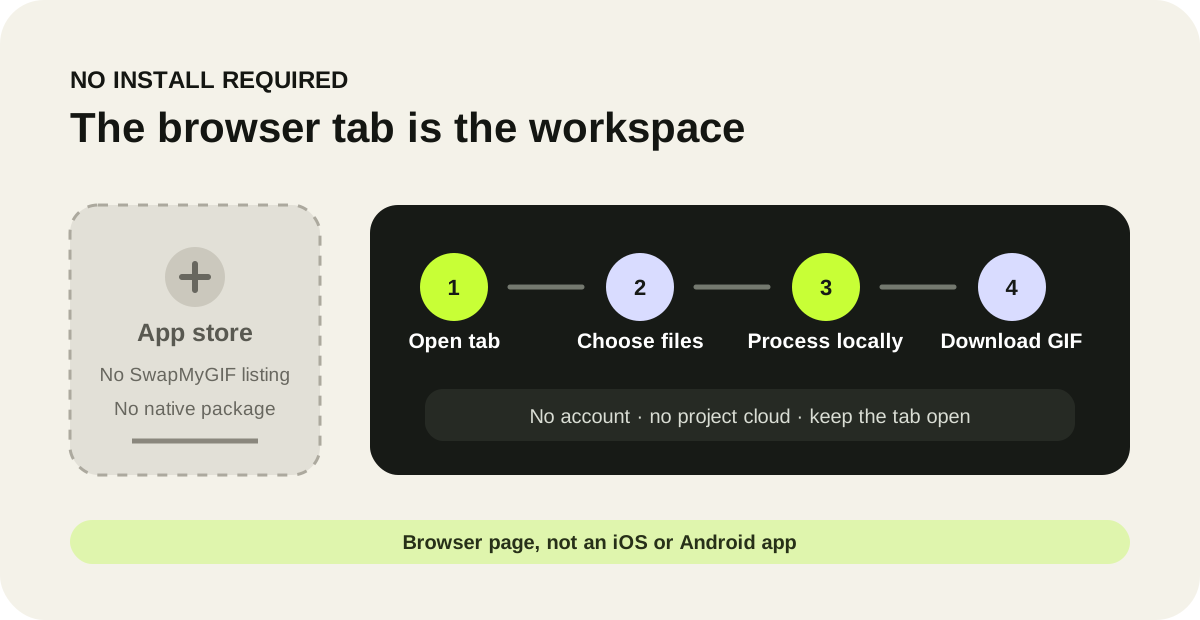
Direct answer: SwapMyGIF is a browser tool, not an iPhone or Android app. Open the page, choose one animated GIF and one JPG, PNG or WEBP face photo, run the swap in the current tab, then download the rebuilt GIF. There is no app-store install, account or saved project library.
First-party product audit
What “app” means on this site
- Delivery
- Web page
- Native package
- None
- Account
- None
- Saved history
- None
Verified against the current public files on October 6, 2026. The site has no web-app manifest, service worker, install prompt or app-store package. Its code reads user-selected files, processes frames in the page and creates a downloadable Blob URL.
No-install workflow
From two local files to one animated GIF
- Open the tool in a current browser. Wait until the page reports Face engine ready.
- Choose one GIF and one face photo. The page accepts an animated GIF up to 30 MB and a JPG, PNG or WEBP portrait up to 10 MB.
- Run the swap in the tab. Keep the page open while it decodes the GIF, detects faces, blends the selected portrait and rebuilds the frames.
- Download and replay the result. Check a complete loop before keeping the file; the site does not save a project history for later.
Choose the right format
Browser tool or installed app?
| Need | SwapMyGIF browser tool | When an installed app may fit better |
|---|---|---|
| Quick one-file swap | Open the page, choose two files and download one GIF. | An install adds friction when you only need a single result. |
| No account or project cloud | No login, cloud library or saved history. | Use an app if you specifically need synced projects across devices. |
| Work without a network | Not supported: page code and face-model files must load from the site. | A genuinely offline native app may be better, but verify its own privacy and storage behavior. |
| Batch or timeline editing | Not supported: one GIF and one face photo are handled at a time. | Use a dedicated editor when you need trimming, cropping, compression or a multi-file queue. |
Browser boundary
Why you still choose files explicitly
MDN documents that FileReader works with files or blobs the user selects; a web page cannot silently browse arbitrary local paths. MDN also documents object URLs, which can point a download link at a Blob created in the page. Those two browser primitives match this tool's visible choose-file and download stages.
Mobile reality check
A phone-sized layout is not a native mobile app
The interface is designed to fit a 480-pixel-wide viewport without horizontal overflow, but that does not turn the site into an iOS or Android package. Processing still depends on the browser, available device memory and the size and frame count of the selected GIF. The recorded compatibility run covers installed desktop Chrome and Edge; it does not claim a completed run on every phone browser.
For the recorded browser versions, layout measurements and troubleshooting gates, read the browser readiness checklist.
Direct answers
GIF face swap app questions
Do I need to install a GIF face swap app?
No. SwapMyGIF runs as a web page. Load the tool, select the GIF and portrait, keep the tab open while it works, then download the result.
Is SwapMyGIF available in the App Store or Google Play?
No. SwapMyGIF is not published as an iPhone or Android app. Do not treat an unrelated store listing as this site's official software.
Can I use it offline after opening the page?
Do not rely on offline use. The page needs network access to load its scripts and face-model files, even though the selected media is processed in the browser.
Will it save my GIF projects?
No. There is no account or saved project library. Download the result before refreshing or closing the tab.
Use the browser workflow