GIF compressor · extension audit
Does a GIF Compressor Remove Metadata?
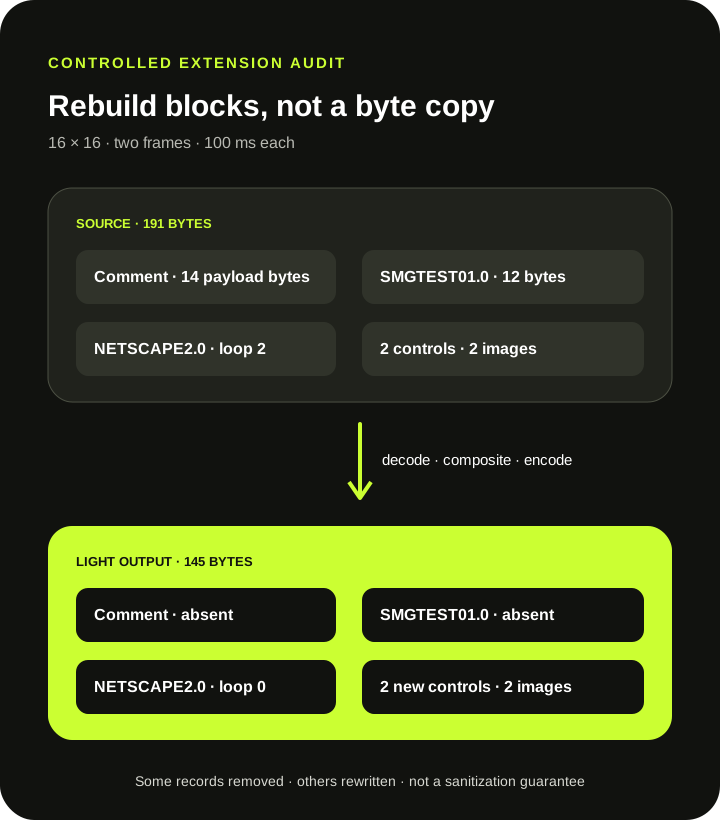
Direct answer: this compressor rebuilds a GIF from decoded pixels instead of copying every source block. In a controlled test, Light removed one 14-byte Comment Extension and one custom Application Extension with a 12-byte payload. It still wrote new Graphic Control Extensions and a NETSCAPE2.0 loop extension, so the output is not metadata-free and the compressor is not a general privacy sanitizer.
Measured production output
A mixed-extension source became a newly structured GIF
| Block or property | Source | Light output |
|---|---|---|
| Comment Extension | 1 · 14 payload bytes | 0 |
| Custom Application Extension | SMGTEST01.0 · 12 payload bytes | Absent |
| Loop Application Extension | NETSCAPE2.0 | NETSCAPE2.0 |
| Graphic Control Extensions | 2 | 2 newly written |
| Canvas · frames · delays | 16 × 16 · 2 · 100/100 ms | 16 × 16 · 2 · 100/100 ms |
| File bytes | 191 | 145 |
Method: scripts/verify-gif-compressor-metadata.mjs generated a two-frame GIF, inserted a comment and a custom application record, processed it through the live Light preset in headless Chrome, then parsed every extension and image block in the exact source and output bytes. These results describe this fixture and this encoder version only.
Metadata is not one field
GIF stores instructions and extra data in separate extension blocks
The GIF89a specification defines Comment, Graphic Control, Plain Text, and Application Extensions as different structures with different roles. A compressor can remove one kind, rewrite another, and add a third. A smaller file therefore does not prove that every non-image record disappeared.
The fixture's comment carried the ASCII text SOURCE-COMMENT. Its custom application identifier was SMGTEST01.0, followed by the 12-byte payload PRIVATE-DATA. Neither record appeared in the Light output. The test used recognizable synthetic strings, not personal data or an uploaded user file.
Current implementation
The compressor reads rendered frames, then writes a new animation
The current path parses the source, asks the bundled decoder for frame patches, composites those patches on Canvas, applies the selected dimensions and palette, and passes indexed pixels to a fresh encoder. There is no step that copies source comments or arbitrary application payloads into the new byte stream.
The encoder does write controls needed by its output: one Graphic Control Extension for every written frame, and a NETSCAPE2.0 extension on the first frame because the compressor supplies repeat: 0. The separate loop-count audit measures how finite and absent source loop instructions become that new endless-loop value.
Privacy boundary
Do not treat compression as a metadata scrubber
This test proves that two chosen source records were not copied. It does not prove that every possible extension, embedded protocol, malformed block, filename used outside the GIF bytes, or data added by another tool will always be removed. SwapMyGIF exposes compression presets, not a metadata inventory or sanitization guarantee.
If a file contains confidential information, use a tool designed to enumerate and remove the relevant data, inspect the final bytes, and keep the original out of any workflow where it should not be shared. Browser-local processing means the selected file is not uploaded to SwapMyGIF; it does not convert a compression result into a certified clean file.
A repeatable metadata check
Inspect the output when extensions matter
- Keep the original. Rebuilding can discard comments, application data, palettes, disposal settings, and finite loop behavior.
- List the source blocks. Record the exact extension types and identifiers your workflow depends on.
- Compress from that original. Do not use an already rebuilt copy when testing preservation.
- Parse the downloaded GIF. Check which blocks remain and which new blocks were written.
- Replay the full animation. Matching dimensions, frames, and delays do not prove identical metadata or loop behavior.
When an application extension is required by a downstream system, assume it is not preserved until the exact downloaded file passes that system's validation.
Direct answers
GIF compressor metadata questions
Does Light keep GIF comments?
Not in the controlled fixture. Its one 14-byte Comment Extension was absent from the Light output.
Does the compressor copy custom application data?
Not in the controlled fixture. The SMGTEST01.0 extension and its 12-byte payload were absent from the output.
Is the compressed GIF metadata-free?
No. The output contained newly written Graphic Control Extensions and a NETSCAPE2.0 loop extension.
Can I use this compressor to sanitize a private GIF?
No sanitization guarantee is provided. Use a dedicated inspection and removal workflow when confidential metadata is a concern.
Inspect blocks, not just pixels and bytes.
A rebuilt GIF can look similar while its comments, application records, controls, and loop instruction differ.
Compress and inspect